College Articulation Blog
Each student will build Chapters of their GitHub Pages College Articulation Blog. It is expected that you have Chapters on JavaScript Objects, Finite State Machines using Objects, and Single Requirements Principles in Coding Methods.
Javascript Objects
Collection of key value pairs.
Example Object (Car)
const car = {
    year: 2006,
    type: "Honda Accord LX Special Edition",
    liscensePlate: "123ABC",
    VIN: "12HG56789MXN45678",
    weightInPounds: 3200,
    color: "Navy Blue",
    passengers: ["bob","john","steve"],
    drive () {
        console.log("VROOM")
    },
    stop () {
        console.log("SCREEECH")
    },
    honk () {
        console.log("BEEP")
    }
}
Javascript objects can have both properties and methods. Properties in this example include: color, year, liscensePlate, etc. Properties can be stored as strings, numbers, objects, arrays, etc. Methods in this example are drive, stop, and honk. These methods can utilize properties inside of the object. Methods act like functions when called.
Finite State Machines (FSM)
FSM helps control the behavior of a system by defining its different states.
Example Finite State Machine (Message Handler)
const messageStateMachine = {
    currentStatus: "pending",

    sendMessage () {
        if (this.currentStatus === "sent") {
            return new Error("message already sent")
        }
        //send message here
        this.currentStatus = "sent"
    },

    unsendMessage () {
        if (this.currentStatus === "unsent") {
            return new Error("message already unsent")
        }
        //unsend message here
        this.currentStatus = "unsent"
    }

    getMessageStatus () {
        return this.currentStatus;
    }
}
This machine has an initial state of ‘pending’. When you successfully attempt to send a message, it will update the status to ‘sent’. If you successfully attempt to unsend a message, it will update the status to ‘unsent’. If you want to see the machines current message status, you could call the method, ‘getMessageStatus’, which returns the current status of the state machine.
Single Responsibility Principle
The concept that any single object in object-oriented programing (OOP) should be made for one specific function.
Coin.js
 collisionAction() {
        // check player collision
        if (this.collisionData.touchPoints.other.id === "player") {
            if (this.id) {
                GameEnv.claimedCoinIds.push(this.id)
            }
            this.destroy();
            GameControl.gainCoin(5)
            GameEnv.playSound("coin");
        }
    }
When a player gets a coin, it will add the coin’s id to the array, claimedCoinIds.
    this.id = this.initiateId()

    initiateId() {
        const currentCoins = GameEnv.gameObjects

        return currentCoins.length //assign id to the coin's position in the gameObject Array (is unique to the coin)
    }
The coin’s id is determined when it is created. So if it were the 5th Game Object created, the coin’s id would be 5. This makes it so you don’t have to go into each coin and give it a unique id.
GameEnv.js
static claimedCoinIds = []
This claimedCoinIds array is reset after every new level.
Game Control Code:
Starting with GameSetup you will describe the JavaScript Objects and how they are collected:
GameSetup.js
skibidiToilet: {
    src: "/images/platformer/sprites/skibidiEnemy.png",
    width: 529,
    height: 884,
    scaleSize: 60,
    speedRatio: 0.85,
},
skibidiTitan: {
    src: "/images/platformer/sprites/skibidiTItan.png",
    width: 529,
    height: 884,
    scaleSize: 1500,
    speedRatio: 0.85,
},
skibidiToilet & skibidiTitan are assests that define the src, width, height, scaleSize, and speedRatio of the enimies
GameSetup.js
const skibidiGameObjects = [
    { name: 'desert', id: 'background', class: Background, data: this.assets.backgrounds.desert },
    { name: 'skibidiTitan', id: 'skibidiTitan', class: skibidiTitan, data: this.assets.enemies.skibidiTitan, xPercentage:  0.35, minPosition: 0.5 },
    { name: 'sand', id: 'platform', class: Platform, data: this.assets.platforms.sand },
    { name: 'blocks', id: 'jumpPlatform', class: BlockPlatform, data: this.assets.platforms.skibidiSand, xPercentage: 0.2, yPercentage: 1 },
    { name: 'blocks', id: 'jumpPlatform', class: BlockPlatform, data: this.assets.platforms.skibidiSand, xPercentage: 0.4, yPercentage: 0.6 },
    { name: 'blocks', id: 'jumpPlatform', class: BlockPlatform, data: this.assets.platforms.skibidiSand, xPercentage: 0.325, yPercentage: 0.8 },
    { name: 'blocks', id: 'jumpPlatform', class: BlockPlatform, data: this.assets.platforms.skibidiSand, xPercentage: 0.2, yPercentage: 0.5 },
    { name: 'blocks', id: 'jumpPlatform', class: BlockPlatform, data: this.assets.platforms.skibidiSand, xPercentage: 0.225, yPercentage: 0.5 },
    { name: 'blocks', id: 'jumpPlatform', class: BlockPlatform, data: this.assets.platforms.skibidiSand, xPercentage: 0.0, yPercentage: 0.5 } ,
    { name: 'blocks', id: 'jumpPlatform', class: BlockPlatform, data: this.assets.platforms.skibidiSand, xPercentage: 0.025, yPercentage: 0.5 },
    { name: 'blocks', id: 'jumpPlatform', class: BlockPlatform, data: this.assets.platforms.skibidiSand, xPercentage: 0.025, yPercentage: 0.5 },
    { name: 'coin', id: 'coin', class: Coin, data: this.assets.obstacles.vbucks, xPercentage: 0.325, yPercentage: 0.7 },
    { name: 'coin', id: 'coin', class: Coin, data: this.assets.obstacles.vbucks, xPercentage: -0.0125, yPercentage: 0.4 },
    { name: 'coin', id: 'coin', class: Coin, data: this.assets.obstacles.vbucks, xPercentage: 0.0125, yPercentage: 0.4 },
    { name: 'coin', id: 'coin', class: Coin, data: this.assets.obstacles.vbucks, xPercentage: 0.0325, yPercentage: 0.4 },
    { name: 'SkibidiToilet', id: 'SkibidiToilet', class: SkibidiToilet, data: this.assets.enemies.skibidiToilet, xPercentage:  0.3, minPosition: 0.07 },
    { name: 'SkibidiToilet', id: 'SkibidiToilet', class: SkibidiToilet, data: this.assets.enemies.skibidiToilet, xPercentage:  0.5, minPosition: 0.3 },
    { name: 'SkibidiToilet', id: 'SkibidiToilet', class: SkibidiToilet, data: this.assets.enemies.skibidiToilet, xPercentage:  0.75, minPosition: 0.5 },
    { name: 'escaper', id: 'player', class: PlayerSkibidi, data: this.assets.players.escaper  },
    { name: 'laser', id: 'Laser', class: Laser, data: this.assets.obstacles.laser, xPercentage:  0.75, yPercentage: 0.5 },
    { name: 'toiletTube', id: 'toiletEnd', class: Tree, data: this.assets.obstacles.toilet },
    { name: 'complete3', id: 'background', class: BackgroundTransitions,  data: this.assets.backgrounds.complete3 },
];
This is a list of all the objects our game level utilizes to operate. Each object has properties such as a name, id, class, and data. The name and id helps us identify each object in the level. The class helps us draw and configure the game objects, and the data gives our game object more properties used to create the image and dimensions.
GameControl.js
gameLoop() {
    // Turn game loop off during transitions
    if (!this.inTransition) {

        // Get current level
        GameEnv.update();
        const currentLevel = GameEnv.currentLevel;

        // currentLevel is defined
        if (currentLevel) {
            // run the isComplete callback function
            if (currentLevel.isComplete && currentLevel.isComplete()) {
                const currentIndex = GameEnv.levels.indexOf(currentLevel);
                // next index is in bounds
                if (currentIndex !== -1 && currentIndex + 1 < GameEnv.levels.length) {
                    // transition to the next level
                    this.transitionToLevel(GameEnv.levels[currentIndex + 1]);
                }
            }
        // currentLevel is null, (ie start or restart game)
        } else {
            // transition to beginning of game
            this.transitionToLevel(GameEnv.levels[0]);
        }
    }

    // recycle gameLoop, aka recursion
    requestAnimationFrame(this.gameLoop.bind(this));
}
In GameControl, the gameloop function controls the transistioning between different levels. It will wait until the currentLevel is complete, and then use the transitionToLevel function to switch to the next level.
GameControl.js
async transitionToLevel(newLevel) {
    this.inTransition = true;

    // Destroy existing game objects
    GameEnv.destroy();

    // Load GameLevel objects
    if (GameEnv.currentLevel !== newLevel) {
        GameEnv.claimedCoinIds = [];
    }
    await newLevel.load();
    GameEnv.currentLevel = newLevel;

    // Update invert property
    GameEnv.setInvert();

    // Trigger a resize to redraw canvas elements
    window.dispatchEvent(new Event('resize'));

    this.inTransition = false;
},
This is the transitionToLevel function. It starts by puting the state of the the game to inTransition. Next, it destroys all existing game objects. Then, if the current game level is not the same as the level it is transitioning to, it will clear the claimedCoinIds. After this, it will set the current level to the new one, and get out of transition mode.
Drawing Game Objects
GameEnv.js
static update() {
    // Update game state, including all game objects
    // if statement prevents game from updating upon player death
    if (GameEnv.player === null || GameEnv.player.state.isDying === false) {
        for (const gameObject of GameEnv.gameObjects) {
            gameObject.update();
            gameObject.serialize();
            gameObject.draw();
        }
    }
}
This is the update function of GameEnv, it is called during the loop. It will loop through each game object and update, serialize, and draw it.
SkibidiToilet.js
update() {
    super.update();

    // Check for boundaries
    if (this.x <= this.minPosition || (this.x + this.canvasWidth >= this.maxPosition)) {
        this.speed = -this.speed;
    };

    //Random Event 2: Time Stop All Goombas
    if (GameControl.randomEventId === 2 && GameControl.randomEventState === 1) {
        this.speed = 0;
        if (this.name === "goombaSpecial") {
            GameControl.endRandomEvent();
        };
    };

    //Random Event 3: Kill a Random Goomba
    //Whichever Goomba recieves this message first will die, then end the event so the other Goombas don't die
    if (GameControl.randomEventId === 3 && GameControl.randomEventState === 1) {
        this.destroy();
        GameControl.endRandomEvent();
    };

    // Every so often change direction
    switch(GameEnv.difficulty) {
        case "normal":
            if (Math.random() < 0.005) this.speed = -this.speed;
            break;
        case "hard":
            if (Math.random() < 0.01) this.speed = -this.speed;
            break;
        case "impossible":
            if (Math.random() < 0.02) this.speed = -this.speed;
            break;
    }

    //Immunize Goomba & Texture It
    if (GameEnv.difficulty === "hard") {
            this.canvas.style.filter = "invert(100%)";
            this.canvas.style.scale = 1.25;
            this.immune = 1;
    } else if (GameEnv.difficulty === "impossible") {
        this.canvas.style.filter = 'brightness(1000%)';
        this.immune = 1;
    }

    // Move the enemy
    this.x -= this.speed;

    this.playerBottomCollision = false;
}
This is the update function of our SkibidiToilet enemy character. Every iteration of the game loop, the update function will be called. This fuction updates the enemy’s position and moves it to a new location.
Examine the GameObjects (canvas items) and see changes in their properties DEMO
How we determine the end of level and where we transition between GameLevels
GameSetup.js
// Game Over screen added to the GameEnv ...
new GameLevel({ tag: "end", callback: this.gameOverCallBack, objects: endGameObjects });
This appears at the bottom of our GameSetup file, and creates a new level for the end of the game. It inlcudes endGameObjects (Which is just a single background for the end of the game), and has a callback function that handles the game ending.
GameSetup.js
gameOverCallBack: async function () {
    const id = document.getElementById("gameOver");
    id.hidden = false;
    GameControl.stopTimer()
    // Wait for the restart button to be clicked
    await this.waitForButtonRestart('restartGame');
    id.hidden = true;

    // Change currentLevel to start/restart value of null
    GameEnv.currentLevel = false;

    return true;
}
This is the callback for the end of a game. It will stop the timer, show the restart button at the top of the screen (with the id of “gameOver”). It will asynchronously wait (await) for the button to be pressed. After it is pressed, it will hide the button and restart the current level (set it to false).
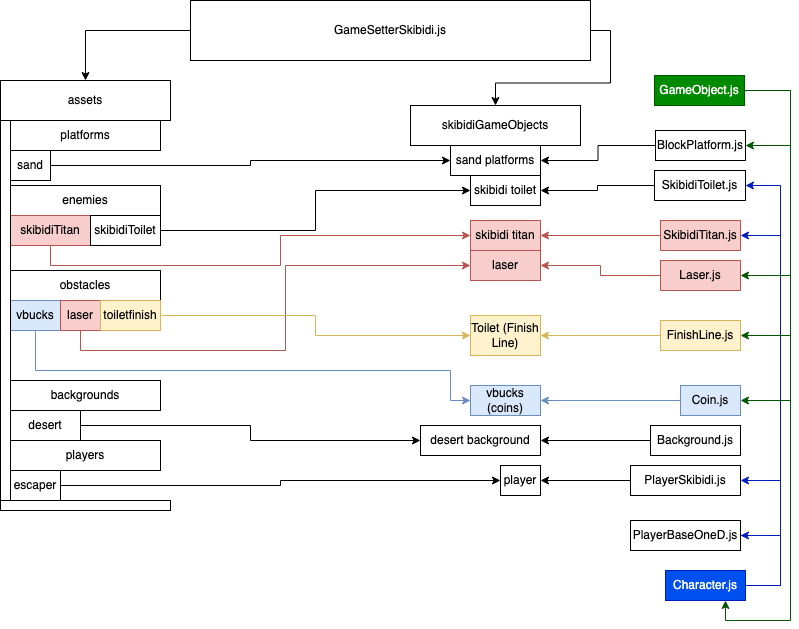
Class Design using DrawIO -
Illustrate the design of GameObjects. Consider how Player, Enemy, and other Obstacles are all GameObjects.
My Favorite Feature
Sorting the leaderboard
getTimeSortedLeaderboardData (slowestFirst) {
        const localData = JSON.parse(localStorage.getItem(this.currentKey))
        if (!localData) {
            console.log("NO DATA")
            return []
        }
        localData.sort((a, b) => a.time - b.time);
        if (slowestFirst) {
            localData.reverse()
        }

        return localData
    },

    getCoinScoreSortedLeaderboardData (highestFirst) {
        const localData = JSON.parse(localStorage.getItem(this.currentKey))
        if (!localData) {
            console.log("NO DATA")
            return []
        }
        localData.sort((a, b) => a.coinScore - b.coinScore);
        if (highestFirst) {
            localData.reverse()
        }

        return localData
    },

    getDateSortedLeaderboardData (newestFirst) {
        const localData = JSON.parse(localStorage.getItem(this.currentKey))
        if (!localData) {
            console.log("NO DATA")
            return []
        }

        localData.sort((a, b) => {
            const dateA = new Date(a.date)
            const dateB = new Date(b.date)

            return dateA - dateB
        })
        //defaults to oldest first
        if (newestFirst) {
            localData.reverse()
        }
        console.log(localData)
        return localData
    }
Array.prototype.sort()
array.sort(function(a,b){
  return a - b
})
If the callback returns…
- Less than 0: “a” is sorted to be a lower index than “b”.
- Zero: “a” and “b” are considered equal, and no sorting is performed.
- Greater than 0: “b” is sorted to be a lower index than “a”.
Date object
“A JavaScript date is fundamentally specified as the time in milliseconds that has elapsed since the epoch, which is defined as the midnight at the beginning of January 1, 1970, UTC”
Array.prototype.reverse()
const items = [1, 2, 3];
console.log(items); // [1, 2, 3]

items.reverse();
console.log(items); // [3, 2, 1]